
In the fast-moving world of digital finance, our needs change. Perhaps you’ve migrated to a different peer-to-peer (P2P) payment app, you’re consolidating your bank accounts, or you simply want to tighten your digital footprint for security. Whatever your reason, closing a Cash App account is a major move that requires more than just hitting “uninstall” on your phone.
Because Cash App is a regulated financial institution, deleting your account is a permanent process with legal and financial implications. You can’t just “undo” it like a social media deactivation.
This guide will walk you through the essential pre-closure checklist and the exact steps to ensure your data and money are handled correctly before you say goodbye to your $Cashtag.
The Critical Pre-Closure Checklist
You cannot close your account if there is any “unfinished business.” If you attempt to skip these steps, the app will likely block your deletion request.
1. Zero Out Your Balance
Cash App will not allow you to close an account with a balance—even if it’s just $0.05.
- Action: Tap the Banking tab (the house or dollar amount icon) and select Cash Out.
- Pro Tip: If you have a tiny balance that is too small to “Cash Out” to a bank, send it to a friend or donate it to a charity to reach an absolute zero.
2. Sell Stocks and Bitcoin
If you’ve used Cash App’s investing features, those assets must be liquidated.
- Action: Go to the Investing tab, select your stocks/Bitcoin, and tap Sell. Once sold, you must then “Cash Out” those proceeds to your linked bank account.
3. Resolve Pending Transactions
Check your activity for any “Pending” payments. If a payment is stuck in limbo, you must wait for it to clear or fail before the system will authorize a closure.
4. Download Your Transaction History (Vital!)
Once your account is closed, you lose access to your transaction history forever. You will need these records for tax season or potential disputes.
- Action: You must do this via a web browser (not the app). Log in at cash.app, go to Settings, and select Download Your Info.
How to Delete Your Cash App Account: Step-by-Step
Once your balance is zero and your data is backed up, follow these steps to permanently close the account.
Step 1: Open the Profile Menu
Open the Cash App on your mobile device. Tap the Profile Icon in the top-right corner (this usually looks like a person or your uploaded photo).
Step 2: Navigate to Support
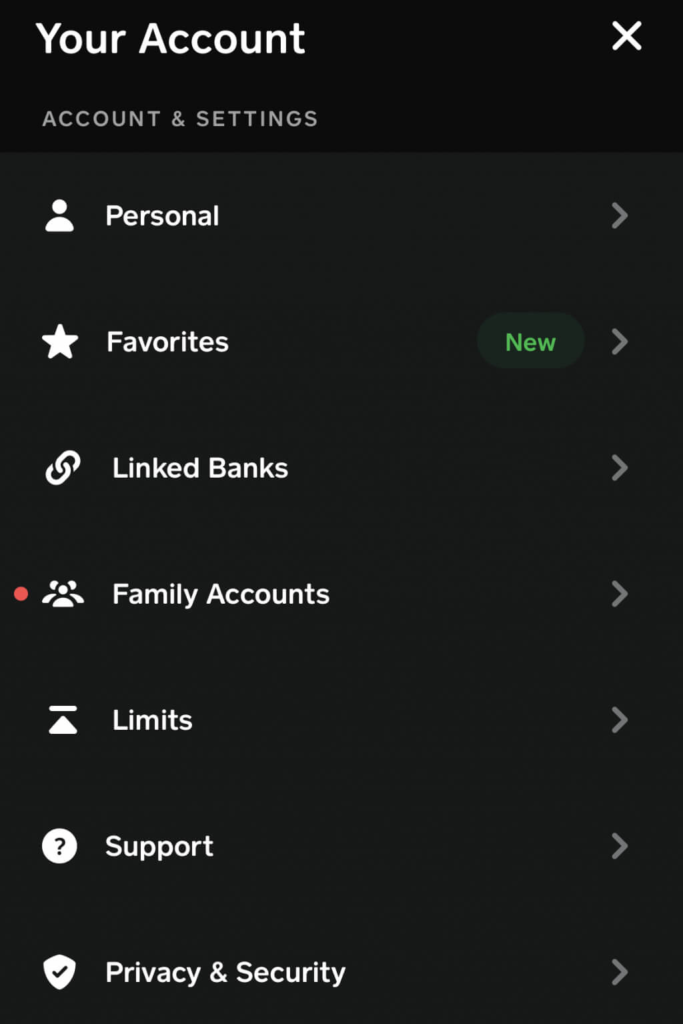
Scroll down to the bottom of the profile menu and tap Support. It is usually represented by a question mark icon.
Step 3: Find the Closure Option
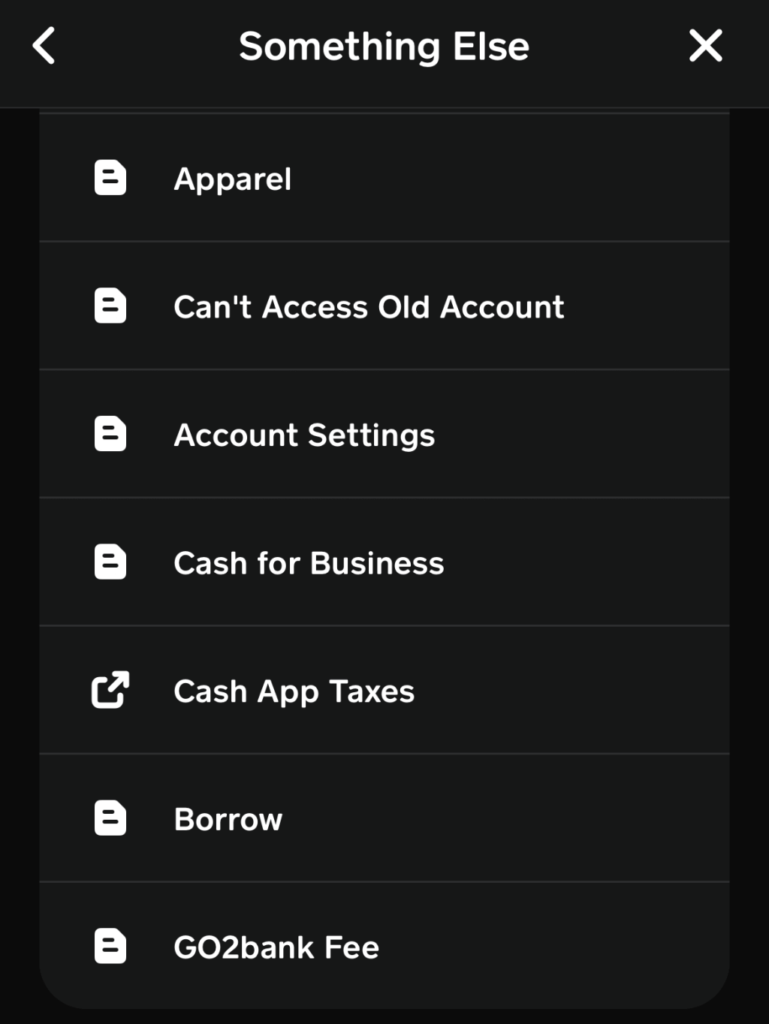
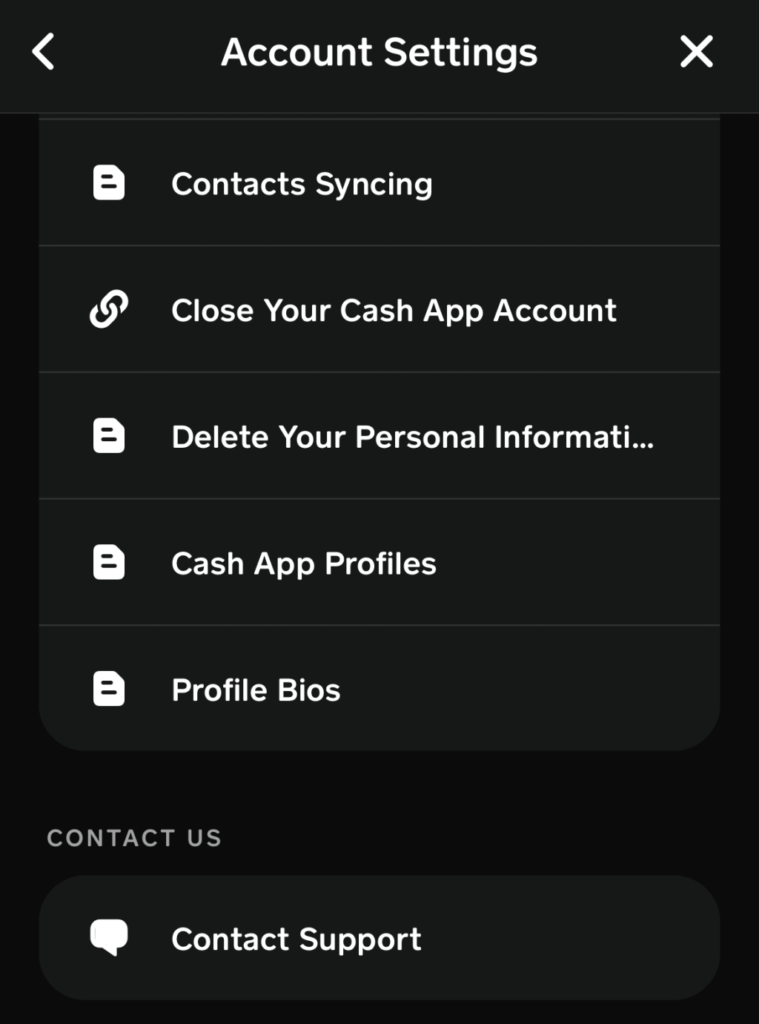
In the support search bar, you can type “Close Account,” or you can navigate manually:
- Tap Account & Settings.
- Select Close Your Cash App Account.
Step 4: Confirm and Finalize
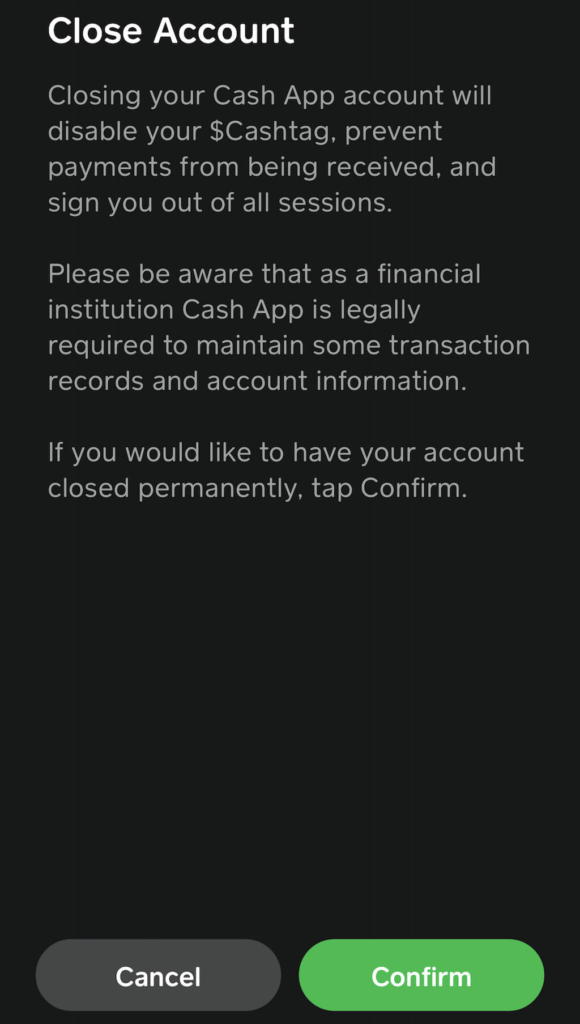
The app will show you a warning screen. It will explain that:
- Your $Cashtag will be deactivated.
- You will be signed out of all devices.
- Anyone trying to send you money will receive an error.
Tap Confirm to finalize. You should receive a confirmation email shortly after.
What Happens to Your Data After Deletion?
A common question is: “If I delete my account, does my history vanish from the world?”
The answer is nuanced. As a financial institution, Cash App is legally required by federal law to maintain certain transaction records and account information for a period of time (typically 7 years). While the account is “closed” and inaccessible to you or other users, the data exists in a secure archive for regulatory and anti-money laundering compliance.
However, deleting your account is the only way to:
- Stop Data Sharing: It prevents further data collection.
- Unlink Identifiers: Your phone number and email are released from that specific $Cashtag.
- Privacy: Your profile will no longer appear in searches or contacts for other users.
Comparison: Closing via App vs. Web
| Feature | Cash App (Mobile) | Cash App (Web) |
| Close Account | Yes (Recommended) | Limited |
| Download History | No | Yes (Mandatory) |
| Sell Stocks/BTC | Yes | No |
| Chat with Support | Yes | Yes |
Troubleshooting Common Issues
- “I can’t log in to delete it”: If you lost access to your phone number or email, you cannot delete the account yourself. You must call Cash App Support at 1-800-969-1940 and undergo a manual identity verification process.
- “The app says my balance isn’t zero”: Sometimes “pending” dividends from stocks or tiny fractions of Bitcoin can leave a “ghost balance.” Double-check every sub-menu in the Investing tab.
- “I want my $Cashtag back later”: Once a $Cashtag is deleted, it is effectively retired. You cannot “reopen” a closed account to reclaim an old tag.
Final Thoughts: Moving On
Closing a financial account is a significant step in managing your “digital hygiene.” By following the steps above—specifically the data download—you ensure that your transition away from Cash App is clean, legal, and secure.
Once the confirmation email hits your inbox, you can safely delete the app from your phone and move forward with peace of mind.